How to search a market by cap rate, rent-to-price or ARV ratio in CapScout
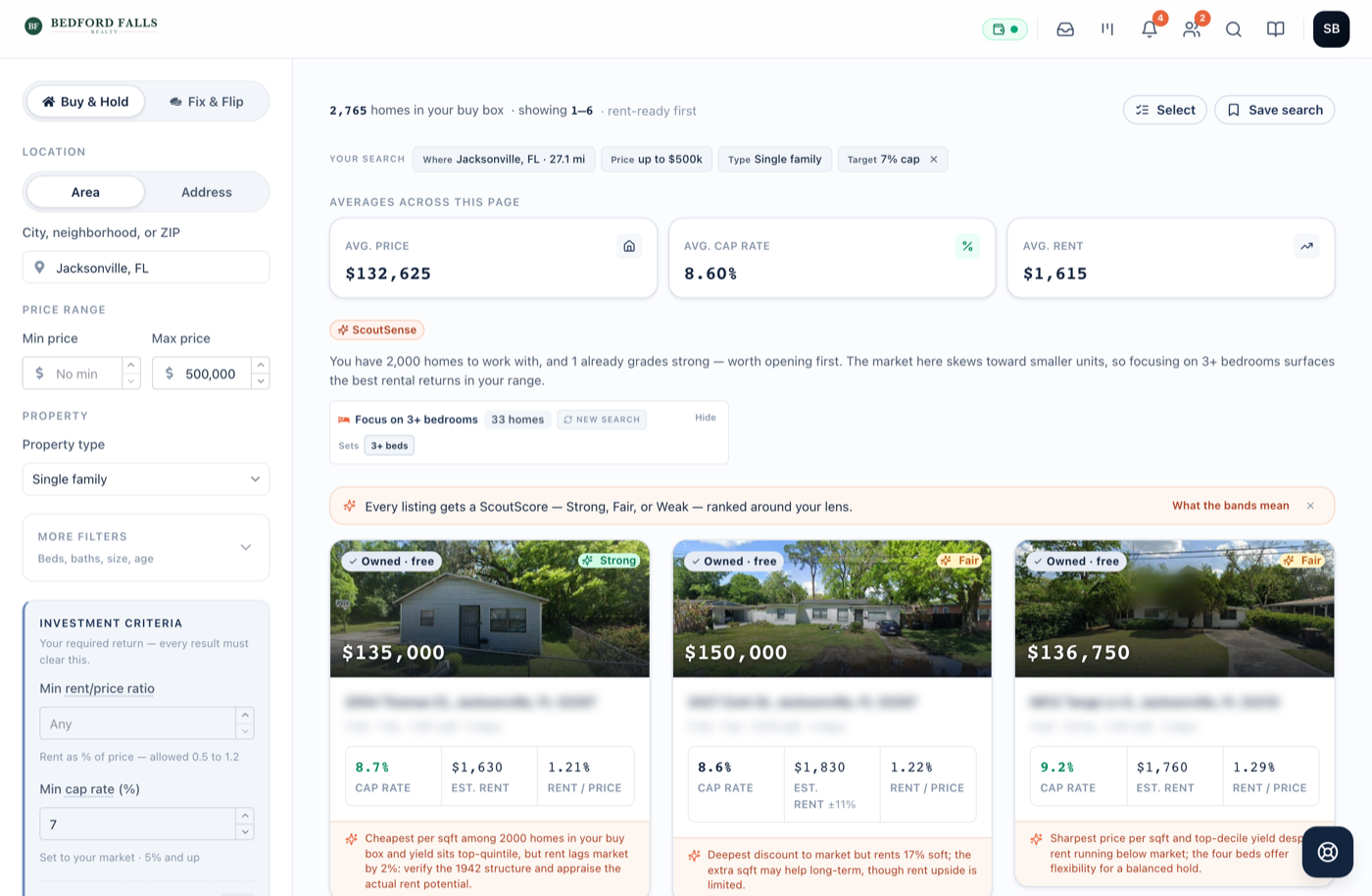
Pick Buy & Hold, enter a city, neighborhood or ZIP code and a price range, then set a minimum cap rate or a minimum rent-to-price ratio. For a flip, pick Fix & Flip and set the most you'd pay as a share of after-repair value. CapScout checks the area's active single-family and multifamily listings against that threshold, leaves out the homes that miss it, and bands the rest strong, fair or weak.
The steps in short
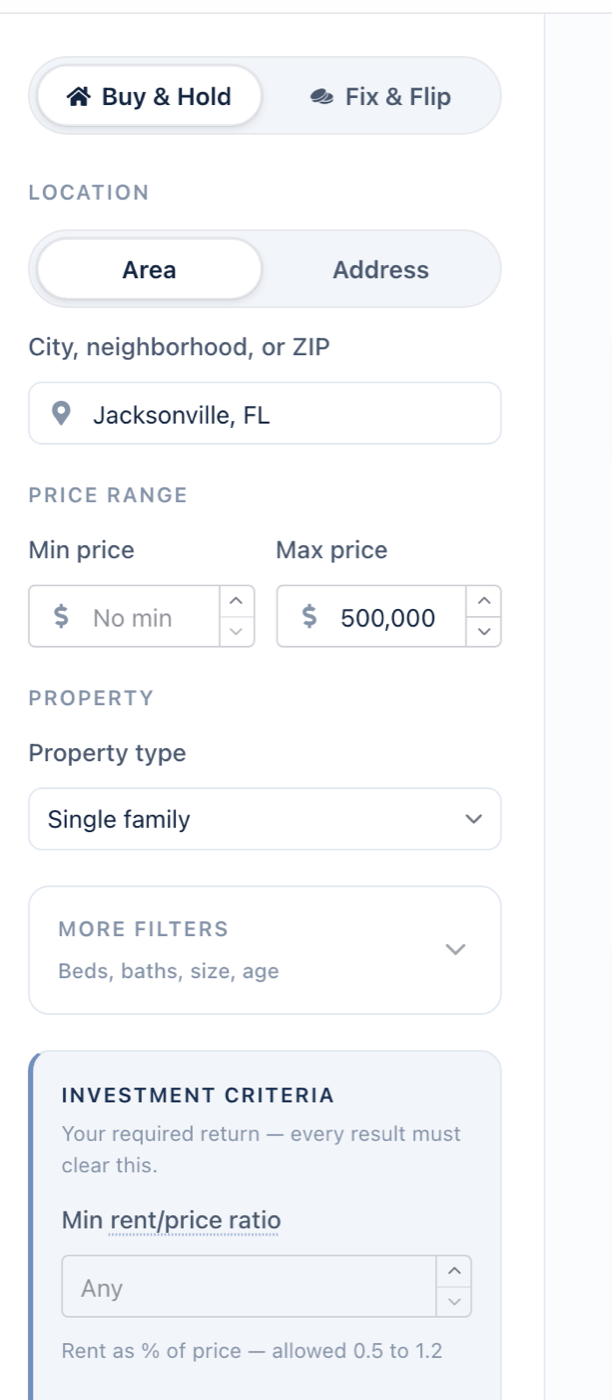
- Choose the strategy and property type. Open the search and pick Buy & Hold for a rental or Fix & Flip for a flip, then Single family or Multi family.
- Set the area and the price band. Enter a city, neighborhood or ZIP code, then a price range. A maximum price is required.
- Set your return threshold. For Buy & Hold, set a minimum cap rate, a minimum rent-to-price ratio, or both; at least one is required. For Fix & Flip, set the ARV ratio: the most you'd pay as a percentage of after-repair value, between 50% and 95%. Press Start exploring.
- Narrow the buy box. Under More filters, add minimum beds and baths, a square-footage range, a built-after year or a minimum lot size. Under Opportunity signals, turn on Relisted lower or 60+ days on market to see only those listings, then press Show results.
- Open the homes worth an underwrite. Click a result for a quick review, then Open full analysis to run the ScoutSense underwrite on the ones that earn it.
- Save the search. Press Save search and choose Daily or Weekly. New listings that clear your threshold are emailed to you on that schedule, in an email of their own or in your digest, as you choose.
CapScout puts your return threshold in the search itself. You set the cap rate, rent-to-price ratio or ARV ratio you’d actually buy at, and the search checks the area’s active listings against it, newest first, as it fills each page of results.
What does the search run over?
Active for-sale listings in the city, neighborhood or ZIP code you enter, single-family and multifamily. It reads the newest listings in the area first, so a results page isn’t padded with homes that have sat unsold for a year.
A neighborhood is searched as a fixed ring around its center; there’s no radius to draw. Everything is on-market: off-market, pre-foreclosure and records-only properties aren’t in it.
How is each threshold tested?
| Threshold | Strategy | What it tests |
|---|---|---|
| Min cap rate (%) | Buy & Hold | Net operating income ÷ listed price, before any mortgage |
| Min rent/price ratio | Buy & Hold | Estimated monthly rent as a % of price; 1.0 is the 1% rule |
| ARV ratio threshold (%) | Fix & Flip | Listed price ≤ your % of estimated after-repair value, less estimated repairs |
The cap rate deducts vacancy, maintenance, management, property tax, insurance and any HOA dues from the estimated rent. Where a county tax bill isn’t available, tax is estimated from a per-state rate adjusted for investment property. Debt service and capital reserves aren’t deducted, which is standard for a cap rate and is why it reads higher than your cash flow will.
A home that misses the threshold doesn’t appear lower down the page. It doesn’t appear at all.
What does the number at the top mean?
With a return threshold set, the header gives two numbers: “At least 7 of 676 homes clear your 7% cap-rate floor.” The second, 676, counts the listings that match your price, beds, baths, size, age and lot filters. The first counts the homes that cleared your threshold so far. It says “at least” because CapScout estimates rent only for the homes it reaches as you page through the results; once it has priced every home in the buy box, the count is exact.
Until a home has cleared, the header shows the buy-box count on its own, as “676 homes in your buy box”. The buy-box number drops out when Relisted lower, 60+ days on market or a ZIP focus is on, because it would no longer describe the page, and when the listing count isn’t available; then the header reads “At least 7 homes clear your 7% cap-rate floor”.
How does ScoutScore sort the results?
Every result arrives with a ScoutScore band (Strong, Fair or Weak) and one ScoutSense sentence on what the cap rate doesn’t show, such as rent sitting under its comps or a relist below the last ask. The band weighs the return itself, the price (and for a rental, the rent) against local levels, the strength of the comparable listings behind the value on a flip, and signs of a motivated seller such as a price cut or a long time on market. It leans less on the threshold you already filtered by, since every result has cleared it.
ScoutScore is a quick read across the page, never a number. The 0–100 AI Investment Score comes from the full ScoutSense underwrite, on the one home you open.
You can also reorder the page. Buy & Hold sorts by rent-ready, newest listings or highest yield; Fix & Flip swaps in most negotiable and biggest spread. Ordering never removes a result.
Where does the search stop?
- Rents and after-repair values are estimates. Each carries a confidence range, and a thin set of comparables is flagged instead of shown as a clean number. Replace them with your own figures in the full analysis before you price an offer.
- Long-term rentals and flips only. There’s no short-term-rental revenue model.
- Single-family and multifamily only. Condos and townhomes aren’t in the search.
- US listings only.
What does it cost?
New homes in your results and full underwrites use credits, and so do new matches on a saved search. Current amounts and plans are on the pricing page.
If you’re setting the thresholds for the first time, how to build a buy box works out a return floor from your own constraints, and the four ways to search listings by cap rate compares this approach with the other tools that do it.
Frequently asked questions
Can I search by cash-on-cash return?
Not as a search filter. Cash-on-cash depends on your down payment, rate and loan terms, so CapScout filters on cap rate and rent-to-price, which don't, and shows cash-on-cash on the Deal Modeling tab, at default financing until you enter your own.
Why didn't a home I expected show up?
Most often it missed your return threshold; the search leaves those homes out entirely. Otherwise it isn't an active listing, sits outside your price band or buy box, or is a property type the search doesn't cover, such as a condo or townhome.
Is the ARV ratio the same as the 70% rule?
At 70%, yes. The search takes estimated repairs off your share of ARV (by default $35 per square foot plus 10%), so at 70% a home passes at or under the 70% rule. Raise your repair rate for homes you expect to need heavy work, then check the rehab in the full analysis.
Does CapScout cover short-term rentals?
No. The rent estimate and the cap rate are for a long-term lease. For Airbnb-style revenue, use a short-term-rental forecasting tool.
Stop running these numbers by hand. CapScout computes the cap rate on every listing that clears your floor, and a full ScoutSense underwrite on the ones you pick.
Start free